
Recap Guide to the 1H 2025 SAP SuccessFactors Release
Make the most of your SAP SuccessFactors solution with our guide covering the most important changes coming with the 1H 2025 release.
The 1H SAP SuccessFactors release is in production and now is the time to review the most impactful items across the SAP SuccessFactors HCM Suite.
SAP SuccessFactors Platform (Foundation)
1. Full People Profile Roll Out Plan
SAP has announced the following roll out plan for the People Profile:
1H 2025
Preview and Spotlight (universal)
Full Profile View (opt-in)
2H 2025
Full Profile View (opt-out)
Full Profile Selected Edit & History (opt-in)
1H 2026
Full Profile View (universal)
Full Profile Selected Edit & History (opt-out)
Beyond 1H 2026
Finish Edit & History
Actions
The level of impact is medium.
2. Preview and Spotlight Enhancements
Preview enhancements:
Display of additional managers and access to manager’s profile
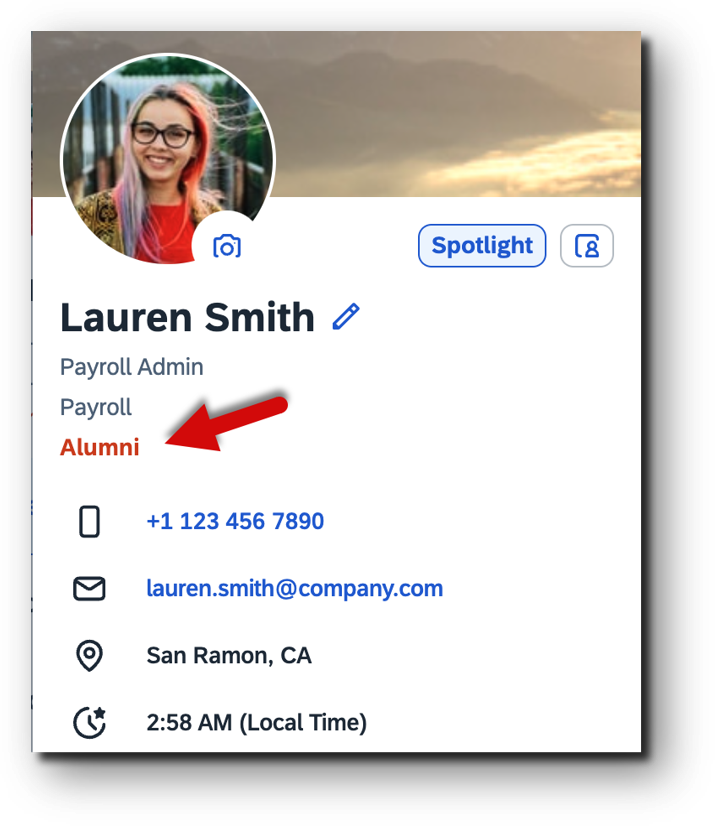
Employment/Alumni indicator
Administrators can now create a data privacy consent statement (DPCS) for profile pictures. The statement is displayed when employees edit their own profile pictures and they can decide whether they accept the DCPS and agree to the use of their pictures in other systems where shared.
You can now control whether to show either the primary employment only or all active employment in the employment switcher on the Profile Preview and Spotlight of the People Profile.
Spotlight enhancements:
The Tags card is now available for employees to view and add tags that highlight skills or interests. Employees can now give badges to anyone and delete any that they’ve given or received on Spotlight.
The level of impact is medium.
3. Latest Org Chart is Universally Available (Web & Mobile)
The Matrix Manager Count is available in the latest Org Chart. You also now have the option to hide contingent workers in the latest Org Chart.
The level of impact is medium.
Click here to watch the full 1H release briefing on SAP SuccessFactors Platform.
SAP SuccessFactors Employee Central
1. Position Follow-Up Processes
Position follow-up processes after imports and API calls are now handled by an event-based solution, which was delivered with Centralized services.
Affected imports:
Job Information
Termination Details
Compensation information
Benefits of new Position Follow-Up Processes:
Improved accuracy
Reduced manual intervention
Better integration
The level of impact is high. Ensure you get familiar with the new event-based solution to maximize accuracy and efficiency in position management.
2. Enhancements in Employee Central Compensation
There is a new Compa Ratio vs Team widget for managers. This makes it possible to add attachments to:
Compensation Information
Recurring Pay Components
Non-Recurring Pay Components
The system checks and prevents the deletion of pay comp in cases where there are related pending workflows.
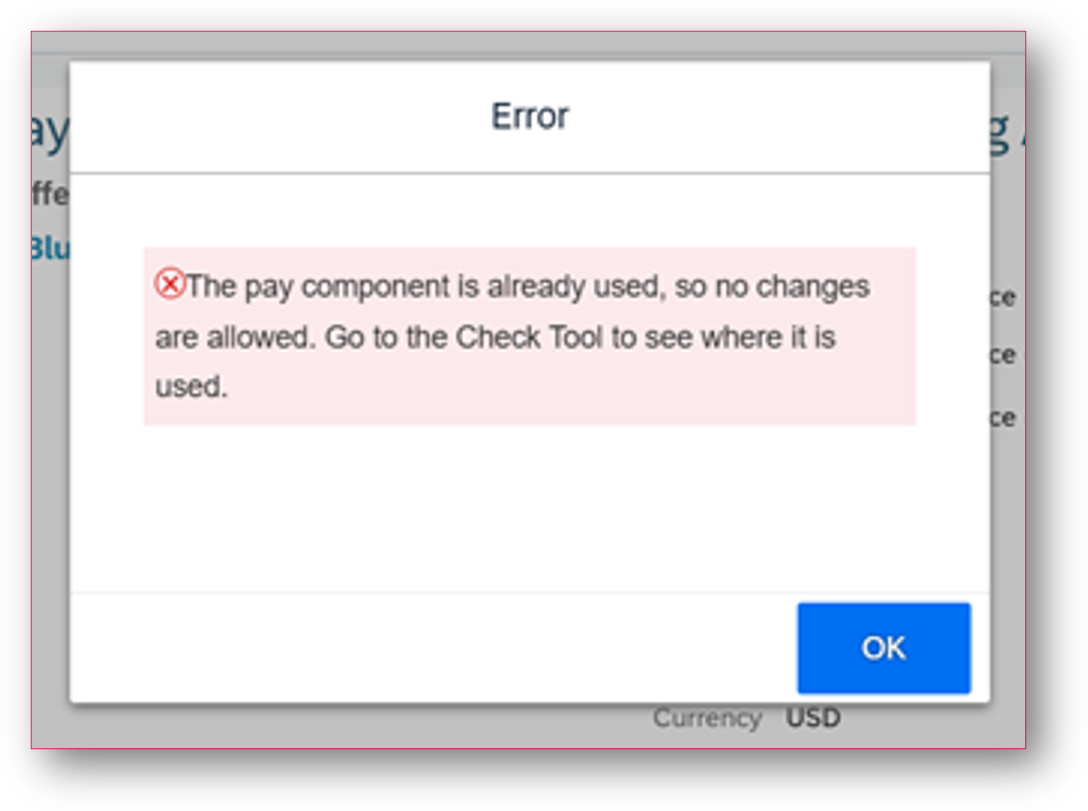
The level of impact is medium. Update your compensation information configuration to benefit from these new enhancements.
Want to know more? Follow the link to watch the full release briefing for SAP SuccessFactors Employee Central.
SAP SuccessFactors Time Management
1. New Balance Calculation Setting for Time Account Types
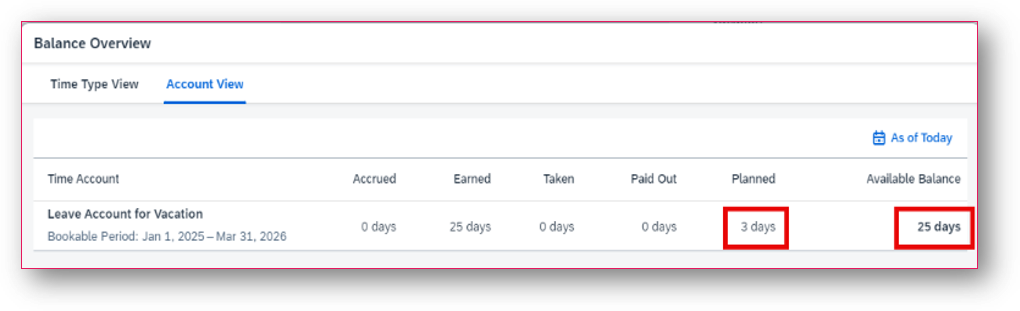
There is a new balance calculation setting for time account types that allows the user to consider future negative bookings (absences and negative manual adjustments) when calculating current time account balances.
Before:
After:
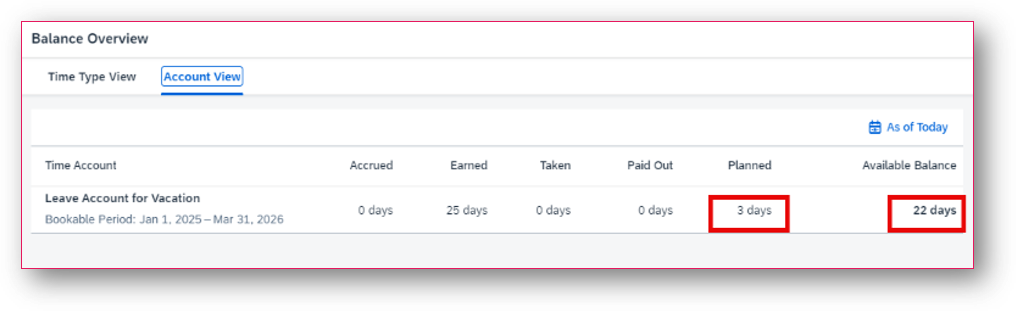
By using the Consider bookings after calculation dates setting in the Time Account Type, you ensure that the balance shown as of today for the time account is consistent with the time type balances. Users will be able to view the complete time account balance as of today’s date considering future bookings.
The level of impact is Medium. Effective People recommends using the new setting to display consistent balances between the time type and account balances.
2. Time Off Ess UI Improvement with Use of Absences Counting Rules
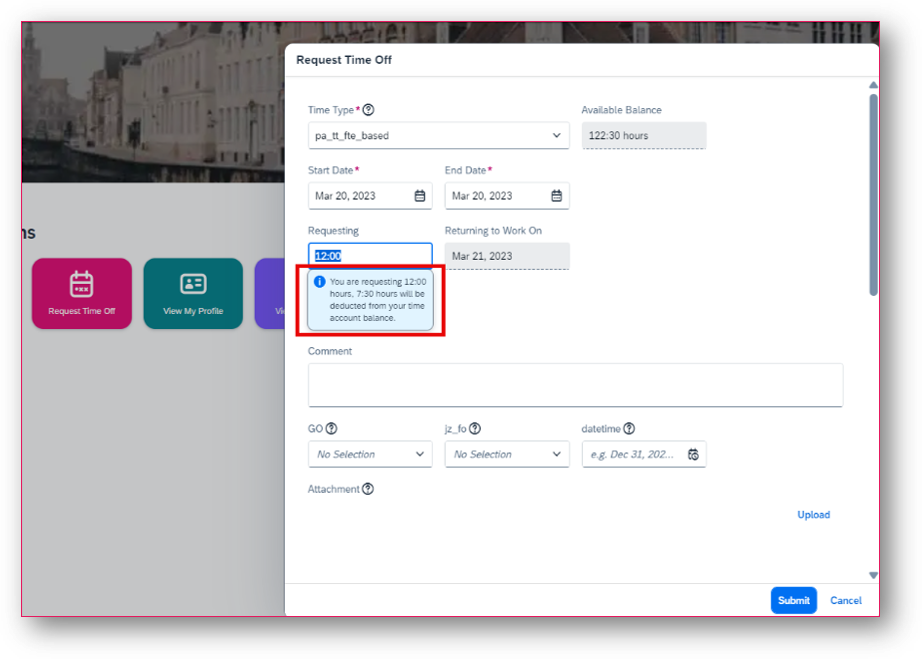
This enhancement to the UI fixes the discrepancy between the requesting quantity and the actual deducted quantity from the employee’s time account balance.
For duration-based users, depending on the configuration, the requesting quantity on the UI is not the same as the one deducted. With this new release, an informative message is displayed in the UI that clearly informs the user what they are requesting and how much will be deducted.
Configuration Requirements
The message is shown if the system is configured as follows:
The time recording variant for is set to Duration.
The Duration Display According To field set to Deduction Quantity in the time type.
The time type permits fractions for days and hours, allowing users to request absences using either a dropdown or an input field.
The absence counting method or absence counting configuration, along with the absence counting rule, is configured in the time type to modify the deduction quantity.
The level of impact is low.
Access the full release briefing recording for Time Management here.
SAP SuccessFactors Recruiting
1. Reimagined Candidate Experience
The Reimagined Candidate Experienced is a user-friendly application process designed to enhance engagement for both internal and external candidates. This feature provides:
More intuitive and engaging application experience that adapts to candidate’s responses.
A centralized hub for managing application-related tasks.
A dedicated profile for updating personal and professional information.
An account settings page for managing preferences and privacy.
This experience is built upon these core components:
Guided Application Experience
My Applications
My Profile
Manage Account
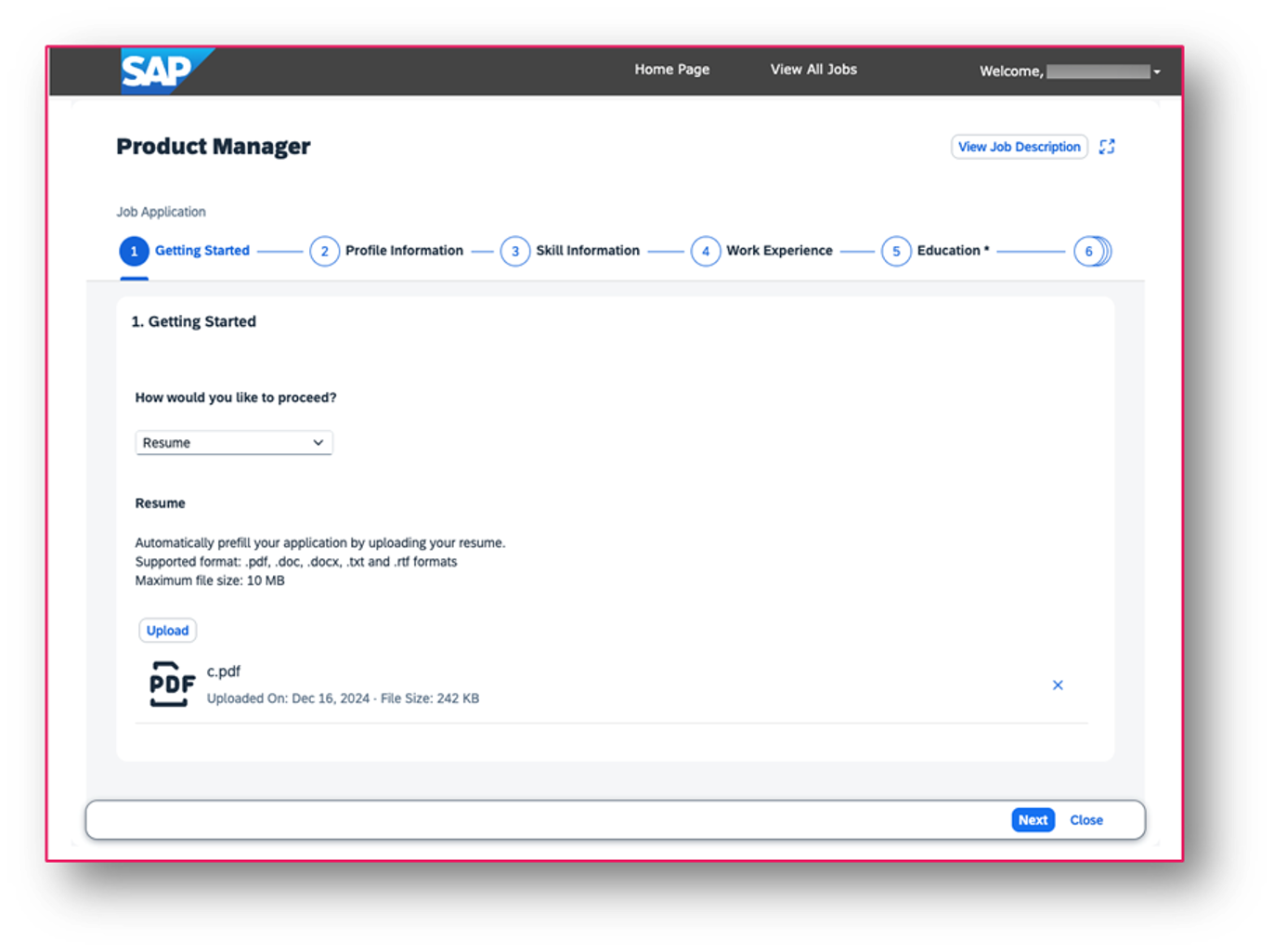
1. Guided Application Experience
Provides a smoother and more intuitive application process
Adaptive design that adjusts to the scope of information required for each job
Wizard-based template and a form-based template that will be used mostly in multistage applications
Use business rules to create a dynamic application experience that adapts based on the candidate's responses
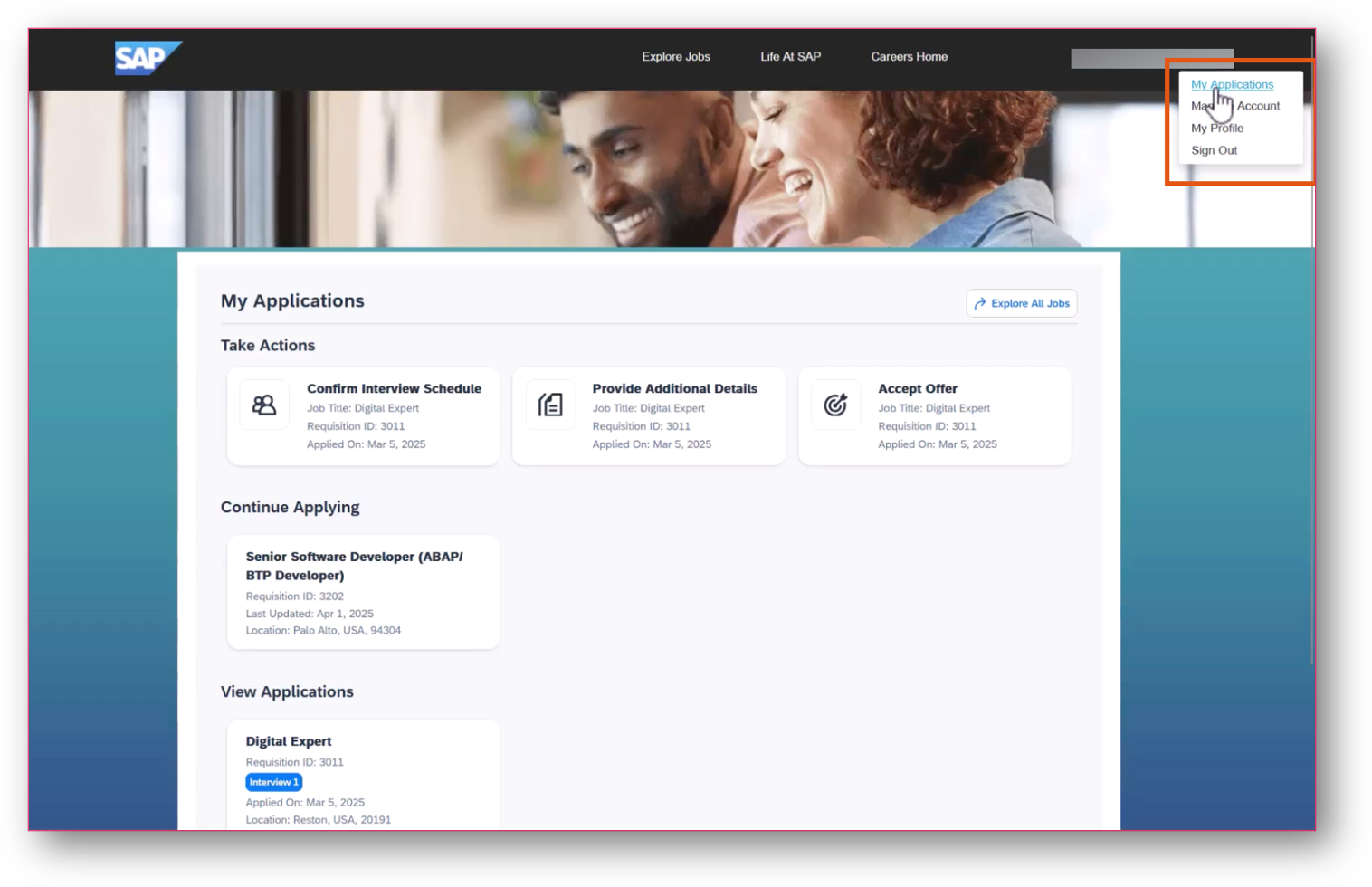
2. My Applications
Provides a centralized hub where applicants can efficiently manage their entire application journey
Logically arranged card so applicants can track the status of their submissions, manage in-progress drafts, and act on any required tasks.
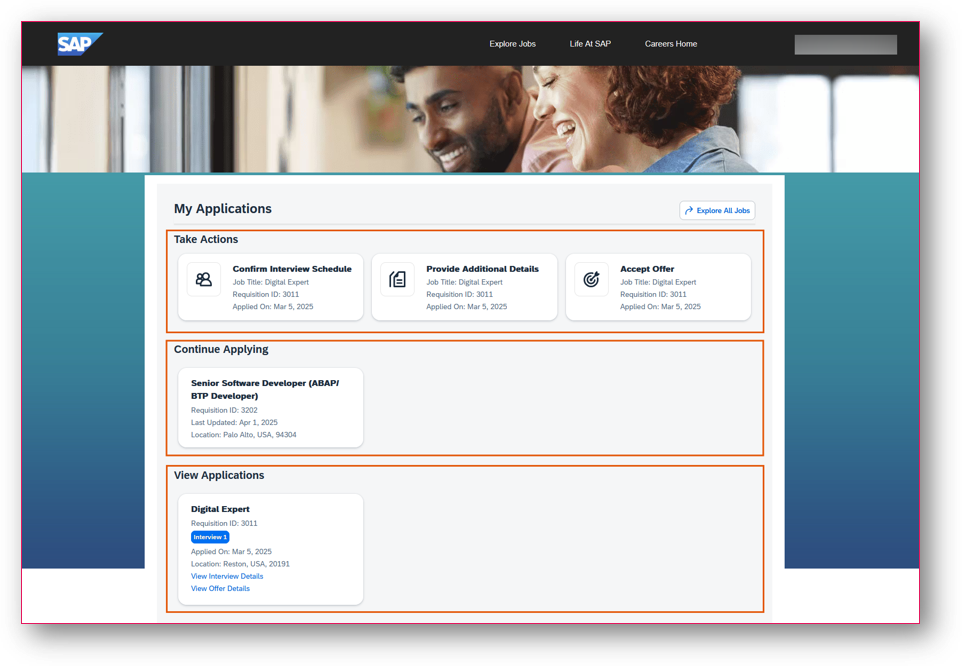
3. Manage Account
Allows candidates to personalize and control their account settings, ensuring a secure experience while using the career site.
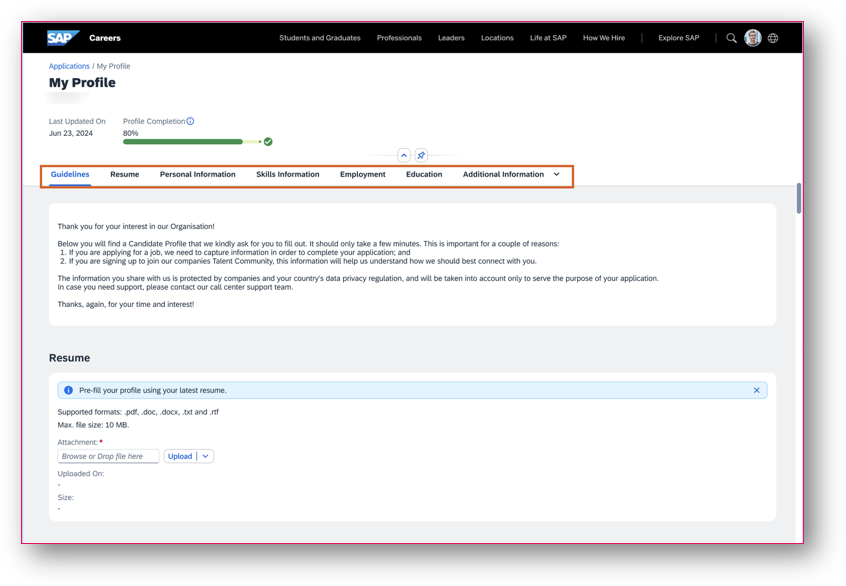
4. My Profile
Serves as a centralized hub that provides a holistic view of a candidate's qualifications, skills, past employment, and other relevant details.
Streamlines the application process and enables recruiters to match candidates with the right opportunities.
Key benefits:
Provides a smoother and more intuitive application process
Adaptive design that adjusts to the scope of information required for each job
Wizard-based template and a form-based template that will be used mostly in multistage applications
Use business rules to create a dynamic application experience that adapts based on the candidate's responses
The level of impact is high.
2. Enhancements to Support Adoption of the Unified Data Model in SAP SuccessFactors Recruiting
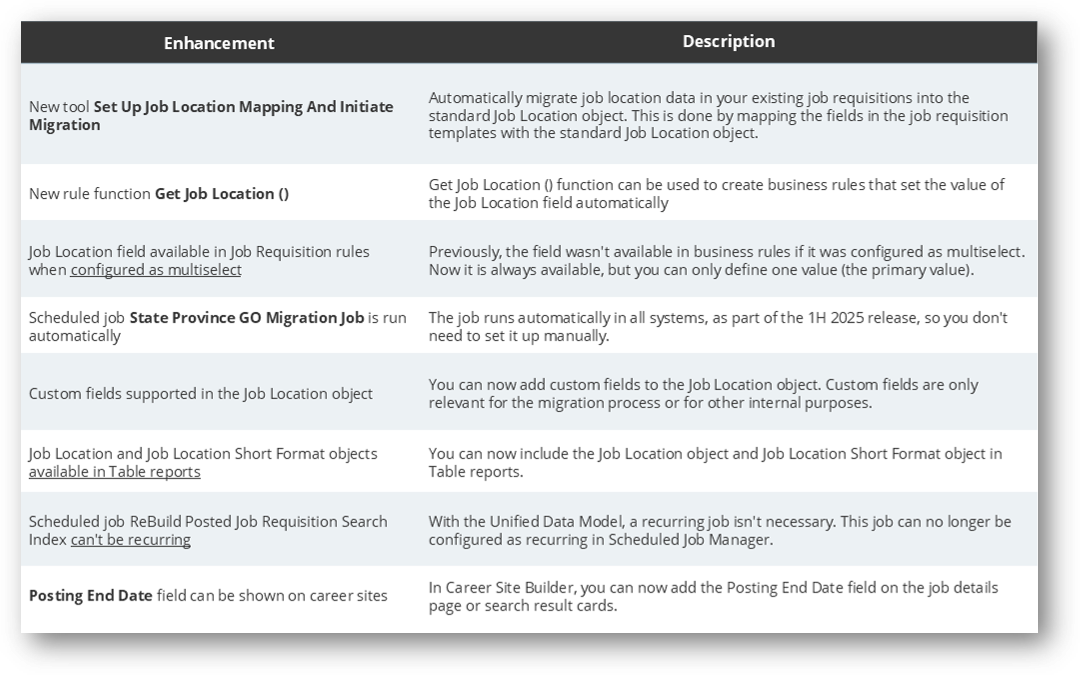
The Unified Data Model (UDM) is a foundation piece of configuration that is recommend to all customers using Recruiting Marketing. Since the transition to UDM can pose some challenges, we now have more tools to support the upgrade.
Before enabling the Unified Data Model (UDM) for SAP SuccessFactors Recruiting, you need to migrate job location data in your existing job requisitions to the standard Job Location generic object.
There are now several enhancements to support the adoption of UDM:
The level of impact is high.
Watch the on-demand release briefing for an in-depth walk-through of the 1H 2024 release for Recruiting here.
SAP SuccessFactors Onboarding
1. Alumni Experience: Post Employment System Access
The Alumni Experience gives former employees to the system after their employment ends.
Benefits:
The feature enables former employees to access their personal information and important documents after leaving the organization.
Providing Alumni Access also reduces inquiries to Human Resources (HR) and support staff.
The level of impact is high.
2. Document Migration from Onboarding 1.0 to Onboarding
Administrators can use the new Initiate Onboarding 1.0 Document Migration Job to initiate the document migration.
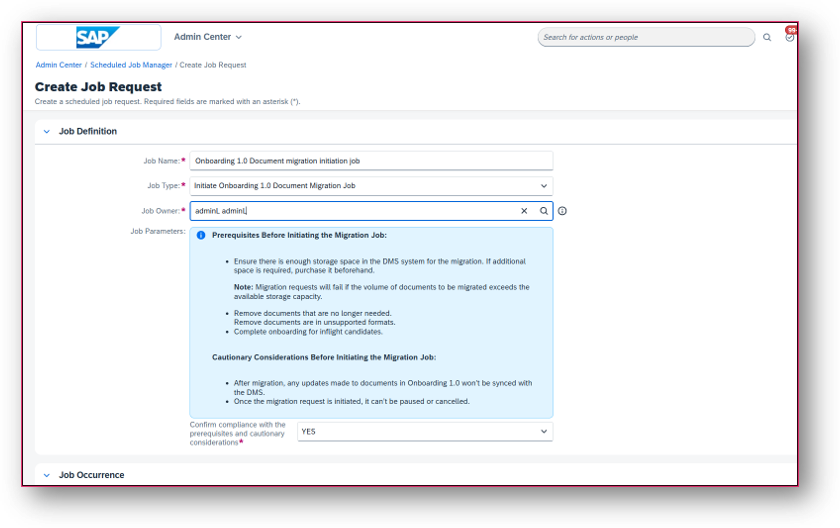
This feature is essential for ensuring a smooth transition to the latest Onboarding solution preserving important onboarding documents and audit data.
The level of impact is high.
3. Enhanced Document Flow Support for Corrections after Final Review Step
When a data correction is requested in the Final Review, the Document Flow now regenerates documents with the corrected data.
This enhancement is crucial for maintaining the integrity of document flow and ensuring accuracy in the documents generated post data correction.
The level of impact is high.
Access the full release briefing recording for Onboarding here.
SAP SuccessFactors Performance & Goals
1. AI-Assisted Performance Insights
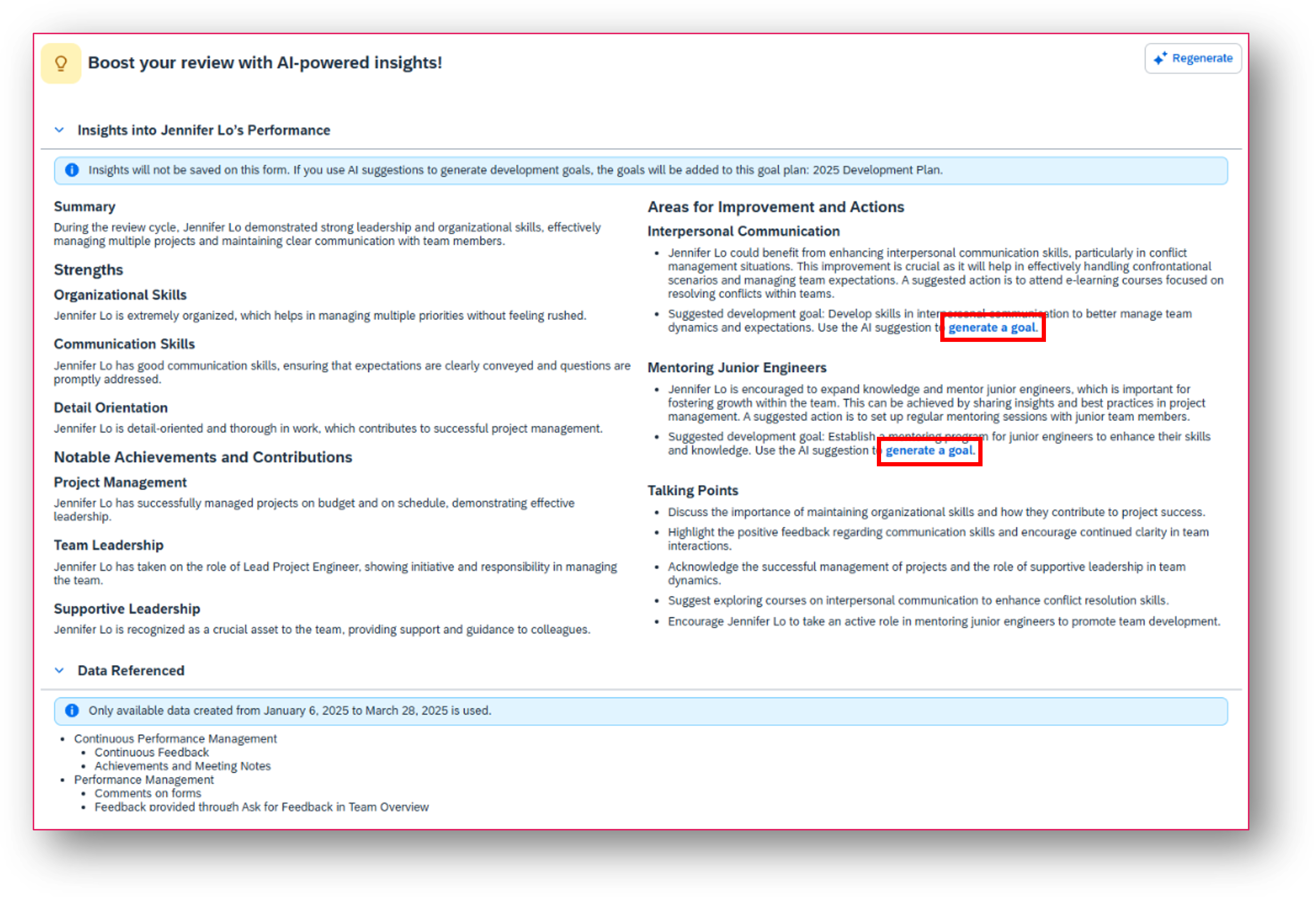
The insights are organized into the following sections:
Summary: Provides a high-level overview of the employee's performance.
Strengths: Reveals areas in which the employee is good at.
Notable Achievements and Contributions: Highlights accomplishments that are worthy of recognition.
Areas for Improvement and Actions: Identifies growth areas and provides achievable suggestions for upskilling and career development. With proper permissions, managers can use AI suggestions to generate development goals for the employee.
Talking Points: Offers performance-related topics for 1:1 meetings.
The level of impact is high. We recommend that you consider implementing this feature. Please note that is requires AI-units license.
2. Latest Experience of Performance Management Forms
In the latest experience, we use a vertical navigation bar, tables, and dynamic side panels to structure form content more closely and intuitively.
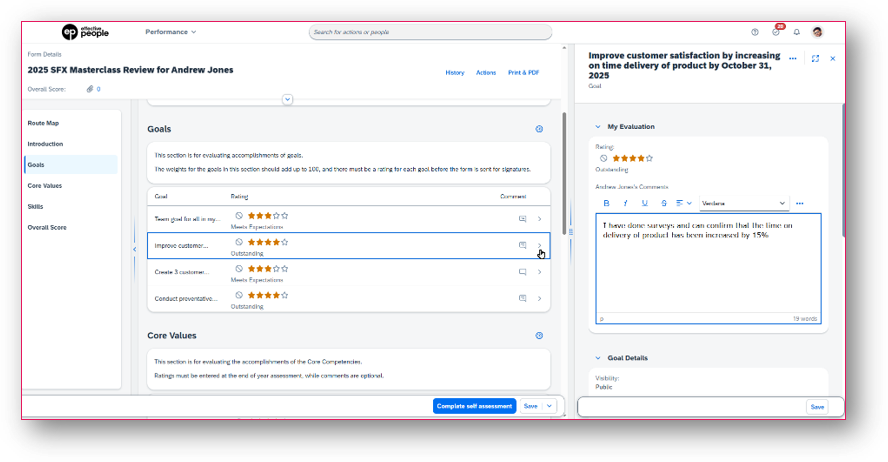
Vertical navigation: The form's navigation bar is displayed vertically.
Tables: In rating sections, the skills, competencies, or goals are listed in tables, making it easier for users to give and compare ratings.
Side panels: The route map, review items, and some other form parts are interactive.
General Information group: If you want some form sections to be displayed in the side panel rather than in the main view, go to Admin Center> Manage Templates and select Move this section under General Information for your intended section. Movable sections are Introduction, Review Dates, Employee Information, and custom sections.
The level of impact is high. We recommend that you consider implementing this feature.
3. Universal Rollout of the Latest Goal Management
Starting with the 1H 2025 release, the latest Goal Management will be universally enabled for all customers.
With this update, all remaining customers still using the legacy version will be automatically upgraded to the latest version. Reverting to the legacy version will no longer be possible. Customers previously excluded from automatic upgrade cycles due to dependencies on legacy Development Goals will remain exempt until they complete their migration to Job Profile Builder or Talent Intelligence Hub.
Users also get the new experience when working with goals in modules that have already integrated with Goal Management, including Performance Management, Continuous Performance Management, Career Development, 360 Reviews, and Card Services.
The level of impact is high. We recommend that you reach out to us if you are still on Legacy Goal management.
SAP SuccessFactors Succession & Career Development
1. Allow Mentors to Manage Development Goals for Mentees
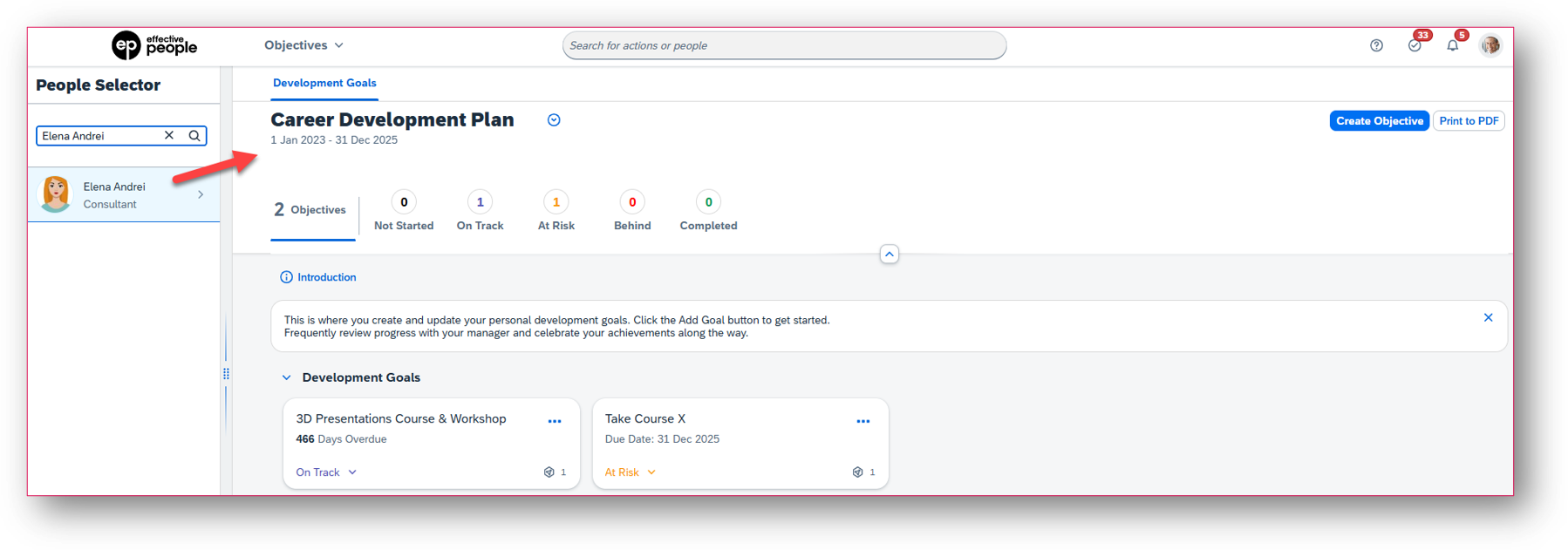
Mentors with proper permissions can now view, edit, create, and delete the development goals of their mentees on both Development Goals and Mentoring pages.
In Development Goals, mentors view a mentee's development goal plan by searching for the mentee in the People Selector panel. All the actions that mentors can take follow the permission configuration of the new mentor (MT) role in the development goal plan template.
In Mentoring, mentors can view a mentee's development goals, grouped in the respective tab. Additionally, mentees can now view and manage their own development goals in the Development Goals tab on the program details page.
The level of impact is High, especially for customers using Mentoring. It allows mentors to actively participate in mentee’s development.
2. AI-Assisted Successor Insights
Leveraging generative AI capabilities, succession planners can now gain insights into the successors that are nominated for a position or an incumbent.
In the Succession Org Chart or the Position Tile view, users can access the feature by selecting the Generate Insights button in the header of a position card.
In the Successor Insights dialog, the insights are organized into the following sections:
Overall Summary: Provides a high-level overview of the job role requirements and all nominated successors
Successors: Provides a summary for each successor
The level of impact is High as the feature allows to gain a deeper understanding of nominated successors and make more informed decisions.
3. Team Development Summary in Latest Career Worksheet
In the latest version of Career Worksheet, managers can now track their team's career development in a summary view, including career aspirations and skill growth.
Managers access the summary view through Growth Portfolio à Team View. On the Summary tab, they can view information in the following sections:
Roles and Aspirations
Identify Skill Strengths Recognize Skills to Improve
The level of impact is High for customers that have adopted CDP & Talent Intelligence Hub (TIH). It provides managers with an overview of their team's career progression, helping them better support their employees' upskilling and development.
4. Browse All Job Roles in Latest Career Worksheet
In the latest version of Career Worksheet, users can now browse all job roles in their organizations to discover target roles.
Selecting a role directs users to its details page, where they can learn more about the role and take further actions. This was possible in the legacy version and now also available in the latest.
The level of impact is Low, but it is a very interesting feature because users don’t have to navigate to the legacy worksheet to perform the action.
Get a full overview of 1H release highlights for Succession & Career Development with our on-demand recording here.
SAP SuccessFactors Learning Management
1. Library: Browse All
The ‘Browse All’ option is back for learners, who just want to browse!
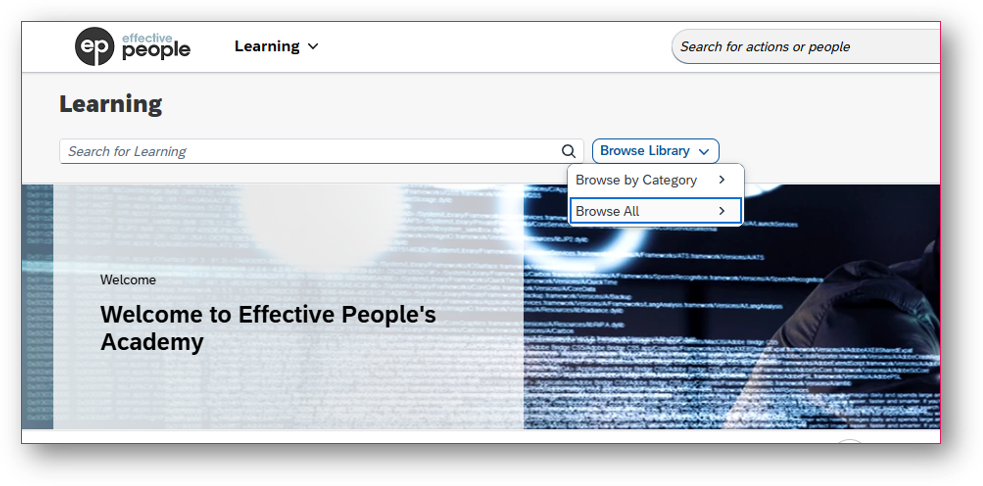
By configuration you can choose if you want to have both ‘Browse All’ and ‘Browse by Category’ enabled.
The level of impact is high.
2. Library – Enhanced Search Optimization
Now, after you create a course and add it to a library, it will be indexed and searchable within 30 minutes.
Most changes will be reflected within 30 minutes, though many updates will occur within just a few minutes. This is a significant improvement from 8 hours (PROD) or 72 hours (Preview) as before.
3. AI-Assisted Image Generation
Assisted AI-Image generation is now available for images on: Items, Curricula, Programs and Custom Cards and Banners.
Describe image in max. 180 characters, then generate.
Pre-requisite:
AI Premium license/AI Units
‘Assisted image generation’ is enabled in ‘AI Services Administration’ (Admin Center)
The level of impact is Low/Medium.
Want to know more? Follow the link to watch the full release briefing for SAP SuccessFactors Learning Management.
SAP SuccessFactors Compensation & Variable Pay
1. Employee Central Data on Statement Template
You're now able to display Employee Central data on the compensation statements without needing to include that field on the compensation plan. The enhancement is supported by compensation, variable pay, as well as combined statement templates.
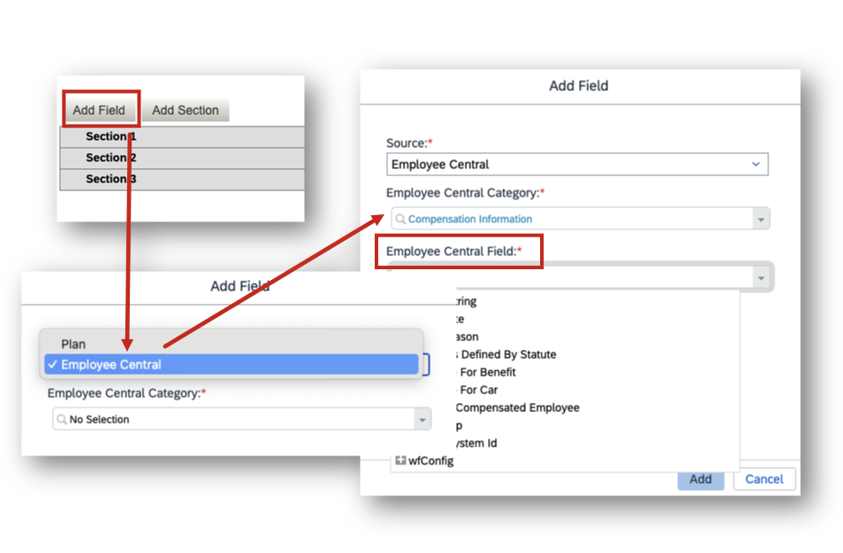
In the current version, you can choose between Plan and Employee Central and add relevant fields to the statement template.
Supported Employee Central Categories:
Job information
Compensation Information
Employment Details
Supported Data types:
Date
Boolean
String
Localized
Translatable
Legacy Picklists
Data types Not Supported:
Number
Amount
Percent
Localized values from MDF Picklists and other data types from Configure Object Definitions.
Root Base objects can’t be selected. Only the child fields under the object can be added.
The level of impact is high.
2. Additional Custom Fields for Guideline Criteria
Two new additional custom fields to use for guidelines when creating guidelines, guideline rules, and guideline modelling for Compensation, Variable Pay, and Total Compensation templates.
The increase in custom fields for guideline criteria gives you the ability to handle complex requirements using a single template thus easing administration. This enhancement is especially useful when your requirements are for a global implementation.
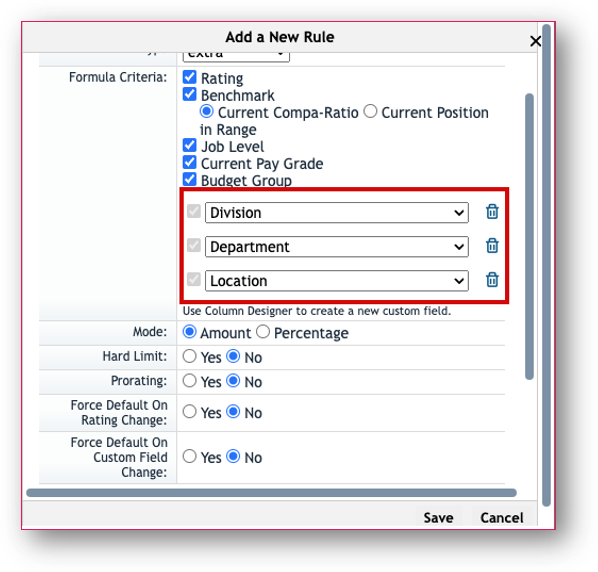
How it looked before.
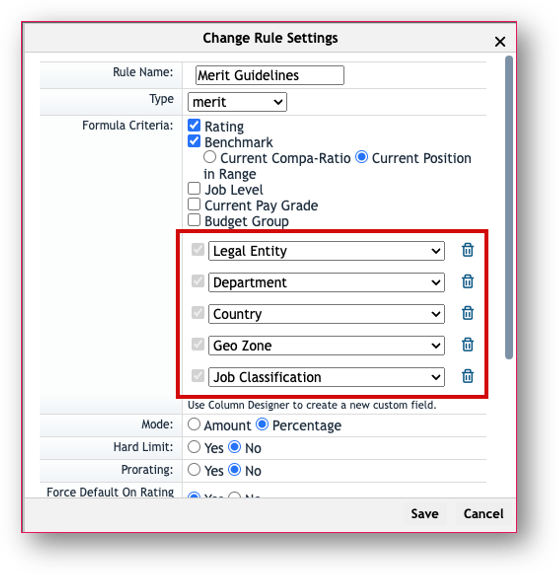
How it looks now.
The level of impact is medium.
To get a full overview of the enhancements for SAP SuccessFactors Compensation & Variable Pay, watch our on-demand release briefing here.
SAP SuccessFactors Workforce Analytics & Reporting
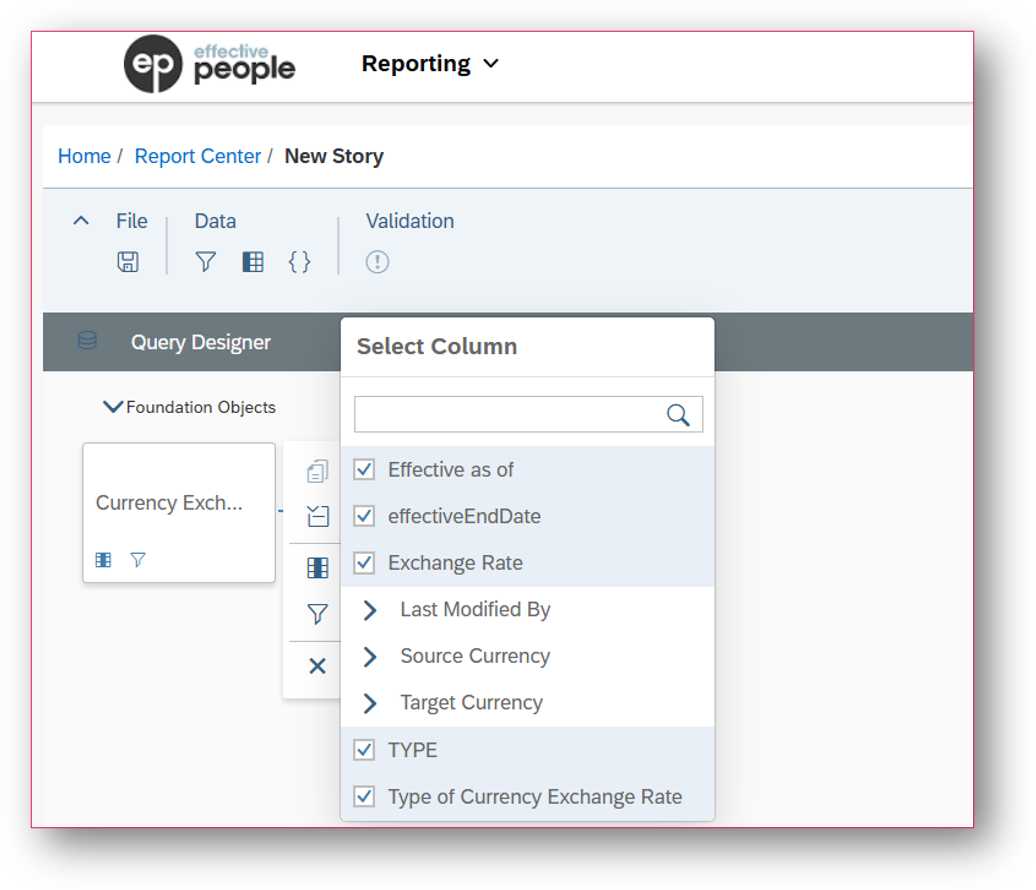
1. Currency Exchange Rate is reportable in Story Reports
Currency Exchange Rate object is now exposed in report stories, allowing currency conversion.
Pre-requisites: currency exchange rate object is configured and maintained; view permission of currency exchange rate foundation object.
The level of impact is high.
2. Story Performance Analysis Tool
This tool lets Story administrators evaluate the efficiency of a Story report. It helps identify areas for improvement and optimize report performance.
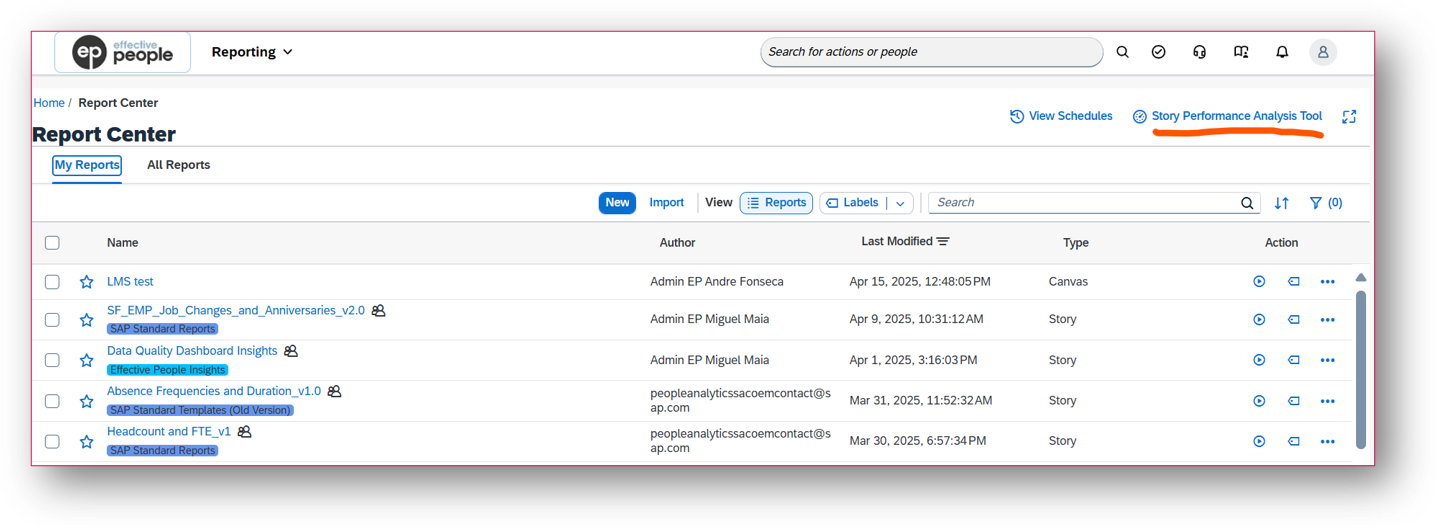
You can access the Story Performance Analysis Tool from Report Center in SAP SuccessFactors.
It allows you to analyze per report per session, including running times and execution times of that action in that session. It’s also possible to search for date, user and report.
This dashboard provides detailed information and a breakdown of these readings. It also identifies processing times for three major areas: Network, Frontend, and Backend.
The level of impact is high.
3. Custom MDF Object Workflows in Story Reports
You can now report on the workflow request details of custom MDF object in Story Reports. The is only possible if you set the pending data field for the custom MDF object to “yes” in the Configure Object Definition page.
This enhancement allows you to easily track who approved a request and when for already approved entries. For pending requests, you can identify who is responsible for approval, giving you a great visibility and control over your workflow processes.
The level of impact is high.
Watch the full SAP SuccessFactors 1H release briefing for Workforce Analytics and Reporting via this link.
SAP SuccessFactors Talent Intelligence Hub
1. Enhanced Opportunity Recommendations in Growth Portfolio and Career Development
For customers who haven’t enabled intelligent recommendations, non-intelligent recommendations are now added to a new section called Opportunities to Grow.
For customers who have enabled the intelligent recommendations, the Opportunities to Grow section will contain both intelligent and non-intelligent recommendations.
The level of impact is medium.
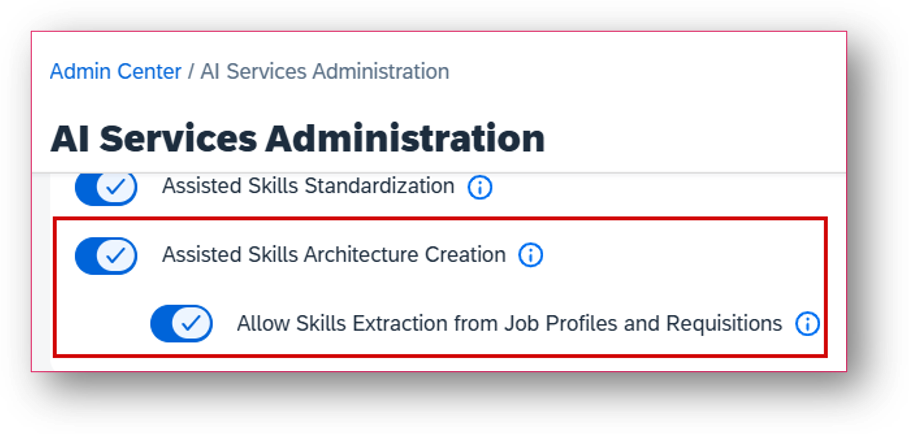
2. New AI Settings for AI-Assisted Skills Architecture Creation
SAP has introduced two new settings in the AI Services Administration to extract skills from job profiles and job requisitions, based on the descriptions of job profiles and job requisitions. This allows you to create skills from the description of job profiles.
The level of impact is medium.
Get a full overview of 1H release highlights for Talent Intelligence Hub with our on-demand recording via this link.
Get in touch
If you're interested in learning more about the 1H release and how to effectively manage SAP SuccessFactors releases, reach out to our expert team.