
SAP AI Readiness Checklist for HR
Many organisations are already asking where they can use AI. The better starting point is the work itself. Which processes are clear enough? Which data can be trusted? Which decisions need human review? Which systems need to connect? Which risks need to be governed before AI becomes part of the employee experience?
AI will not fix a weak HR process. In many cases, it will reveal the weakness faster.
For SAP SuccessFactors customers, readiness means preparing the HR landscape so AI can support real work: answering questions, guiding managers, supporting recruiters, improving service delivery, surfacing insights, and helping processes move with more confidence.
This checklist gives HR, HRIT, CIO, and transformation teams a practical place to start.
1. Process readiness
Before choosing an AI use case, map the real HR process.
This means looking beyond the process diagram and understanding how the work actually happens day to day.
Ask:
How does the process work today?
Which steps are manual?
Where do approvals slow down?
Who owns each decision?
Where do employees or managers ask for help?
Which exceptions happen repeatedly?
Where does work move outside SuccessFactors?
Which parts of the process are unclear, duplicated, or locally adapted?
AI needs a defined process to support. If the process is poorly understood, the AI use case will remain vague.
Readiness signal:
You can describe the process clearly, including ownership, decision points, exceptions, and handoffs.
2. SuccessFactors data readiness
SAP SuccessFactors often holds the core HR data that AI needs to reason over employee, role, talent, and workforce context.
That makes data quality one of the most important readiness areas.
Ask:
Which data is maintained in SuccessFactors?
Which fields are complete and reliable?
Where are values standardised?
Which objects are difficult to interpret?
Are job, position, manager, location, employment status, and effective-dated records accurate?
Who owns corrections when data is wrong?
How often is critical HR data reviewed?
Are local variations documented and understood?
AI-supported HR processes depend on clean context. If job information, manager relationships, permissions, locations, or effective dates are unreliable, the output will be unreliable as well.
Readiness signal:
The data required for the use case is complete, current, standardised, and owned by named teams or roles.
3. Integration readiness
AI in HR rarely lives inside one application.
A single process may involve SuccessFactors, payroll, identity management, learning, IT service management, document repositories, access management, communication tools, and reporting platforms.
The user may see an AI assistant. The value often comes from the integration layer behind it.
Ask:
Which systems are involved in the process?
Which systems send data?
Which systems receive data?
Does the process require real-time integration or batch updates?
Which APIs, events, or connectors are available?
What should trigger the process?
What happens if an integration fails?
Who monitors failures?
How are exceptions surfaced and resolved?
Integration readiness is often the difference between a useful AI experience and a polished demo that cannot scale.
Readiness signal:
The required systems, data flows, triggers, failure points, and monitoring responsibilities are documented.
4. Security and access readiness
HR data is sensitive. AI readiness therefore needs strong security and access design from the start.
A helpful answer can become a risky answer if the user should never have seen the information behind it.
Ask:
What data can the AI access?
Which data should remain restricted?
Does the user have permission to see the answer?
Are role-based permissions correctly configured?
Are country-specific privacy and labour rules respected?
Can sensitive data be masked or restricted?
Where is data processed?
Can outputs and actions be audited?
How are access changes managed over time?
Security is an IT concern. In HR, it is also an employee trust concern.
Readiness signal:
Access rules, data restrictions, audit requirements, and privacy boundaries are clear before the use case is designed.
5. Knowledge readiness
Many HR AI use cases rely on knowledge: policies, FAQs, process documents, country rules, benefit guides, onboarding instructions, and internal procedures.
If that knowledge is outdated or inconsistent, AI will struggle to provide trusted support.
Ask:
Where is the official HR knowledge stored?
Who owns each policy or document?
How often is content reviewed?
Are there conflicting versions?
Can global and local policies be distinguished?
Are country-specific rules clearly labelled?
What should happen when the answer is uncertain?
How will knowledge updates be managed after launch?
AI can be highly effective for HR policy and service support when the knowledge base is clean, structured, and maintained.
Readiness signal:
Official HR knowledge is easy to identify, owned, current, and structured in a way AI can use safely.
6. Decision readiness
Every AI use case needs clear decision boundaries.
Some tasks can be answered automatically. Others can be drafted, summarised, routed, or recommended. Sensitive decisions may require human review every time.
Ask:
Can AI answer directly?
Can AI suggest an action?
Can AI create a draft?
Can AI trigger a workflow?
When should AI escalate to HR?
When should AI refuse to answer?
Which decisions require human approval?
How will users know whether the output is a recommendation or an action?
How will errors or disputed outcomes be handled?
Good AI design gives people more time for judgement by reducing repetitive work. It also makes accountability clear.
Readiness signal:
The use case defines what AI may answer, recommend, draft, trigger, escalate, or refuse.
7. Measurement readiness
AI should solve a measurable problem.
Before starting, define the current baseline. Without it, value becomes difficult to prove.
Ask:
How long does the process take today?
How many tickets or requests are created?
Which questions are repeated most often?
How many errors occur?
How much manual effort is involved?
Where do employees or managers wait longest?
What does the current experience feel like for users?
Which business or HR outcome should improve?
Then define success in practical terms.
Possible measures include:
Faster response times
Lower ticket volume
Fewer manual checks
Better data quality
Fewer process errors
Higher case deflection
Improved employee experience
Less repetitive work for HR teams
Faster manager self-service
Shorter cycle times
Readiness signal:
The team has a baseline, target outcome, and agreed way to measure improvement.
8. Operating model readiness
AI use cases need ownership after go-live.
Someone must maintain the process. Someone must monitor the outputs. Someone must review errors, update knowledge, manage access, and decide when the use case needs to change.
Ask:
Who owns the AI use case?
Who monitors performance?
Who reviews incorrect or low-confidence outputs?
Who maintains the knowledge base?
Who updates the process when policies change?
Who handles escalations?
Who approves changes to the use case?
How often will the use case be reviewed?
Which team supports the solution after launch?
An AI use case can work well in a pilot and still fail later if ownership is unclear.
Readiness signal:
There is a named operating model for support, monitoring, maintenance, governance, and continuous improvement.
9. Change management readiness
AI adoption in HR depends on trust.
Employees, managers, and HR teams need to understand how AI will show up in their work, what it can do, what it cannot do, and how to challenge or correct an outcome.
Ask:
Have employees and managers been told how AI will be used?
Do users know when they are interacting with AI?
Is there a clear route to question or appeal an AI-influenced outcome?
Have HR teams helped shape the use case?
Do managers understand when AI is providing a suggestion?
Do employees know where human support remains available?
Is there a communication and training plan?
Does support continue after launch?
A technically strong AI use case can fail if people do not trust it or understand it.
Readiness signal:
Users understand the purpose, boundaries, support route, and human accountability behind the AI use case.
10. Pilot readiness
The best first AI use case is usually the one with a clear process, available data, manageable risk, and measurable value.
Start where success can be proven. Then scale with confidence.
Good early HR use cases may include:
Answering HR policy questions
Classifying HR tickets
Summarising employee cases
Supporting onboarding questions
Helping managers find the right process
Drafting job descriptions
Routing requests to the right team
Checking missing information before a workflow moves forward
Explaining payroll or time-related queries within approved boundaries
Ask:
Is the process well understood?
Is the data available and reliable?
Is the risk manageable?
Can success be measured?
Are users willing to test it?
Can the use case scale if the pilot works?
Is there a clear owner after launch?
Readiness signal:
The pilot has a defined scope, accountable owner, measurable value, and a realistic path to scale.
11. Leadership readiness
AI readiness also depends on leadership alignment.
HR, IT, legal, security, data protection, and business leaders need a shared understanding of what AI is expected to improve and how far it should go.
Ask:
What business or HR problem are we solving?
Why is AI the right way to support it?
Which outcomes matter most?
What risk level is acceptable?
Where must human judgement remain central?
Who owns the roadmap?
How will priorities be agreed?
How will value be reported?
How will decisions be made when teams disagree?
A useful leadership expectation sounds like this:
AI can improve HR when it is connected to the right processes, data, systems, controls, and people.
That is a practical foundation for SAP AI readiness.
Readiness signal:
Leadership agrees on the purpose, value case, governance boundaries, ownership model, and first priorities.
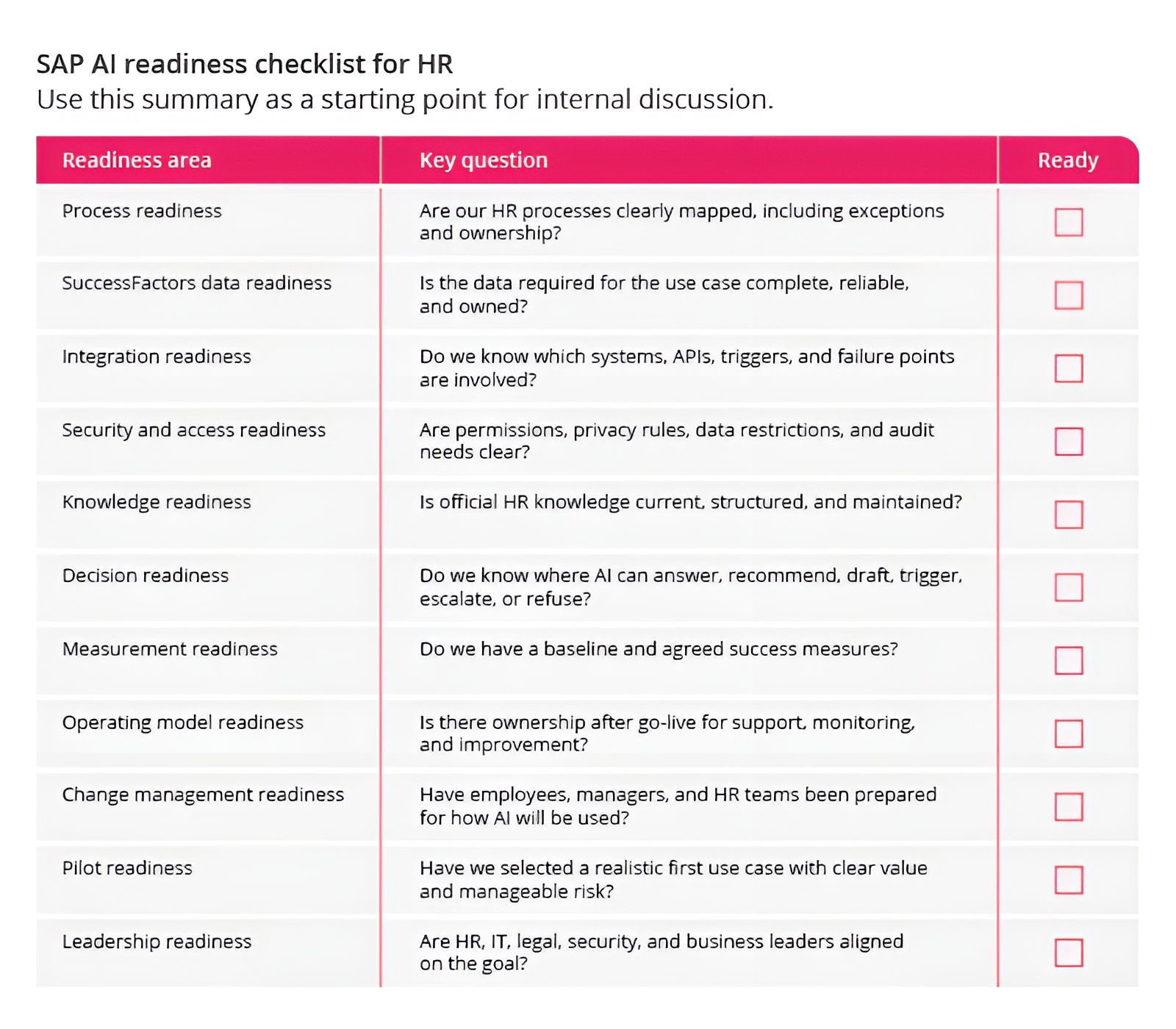
Final thought
AI in HR has real potential. SAP SuccessFactors customers are right to pay attention as SAP Business AI, Joule, and agentic capabilities become more embedded in the HR landscape.
The organisations that gain the most value will be the ones that prepare the work around the technology.
That preparation starts with process clarity, trusted data, integration design, governance, change management, and leadership alignment.
In other words, SAP AI readiness starts before activation.
It starts with the foundations that allow AI to help HR work better.



About the author
Jorge Sá is a senior SAP Integrations consultant specialising in SAP SuccessFactors and AI-enabled HR architectures on SAP Business Technology Platform. He works hands-on with skills inference, job architecture, data models, and Joule Skills to design deterministic, auditable AI capabilities that support workforce and talent decisions.
Wondering how ready your HR landscape is for SAP Business AI?
EP can help you assess your current SuccessFactors environment, identify practical AI use cases, and build a readiness roadmap across process, data, integration, governance, and adoption. Book an SAP AI Readiness Workshop with EP.